Picture Sarah, a software engineer who just got hired after a great virtual interview. It’s Monday morning in 2025, and she’s in her Seattle apartment, excited to start her new remote job. She opens her laptop, clicks the link in her welcome email, and heads straight into the onboarding portal.
But things start going wrong quickly. The training videos keep buffering because her Wi-Fi is acting up. She’s asked to sign a stack of old forms, but none of them open properly on her phone. Her mentor is in Mumbai, where it’s the middle of the night, so her questions on Slack sit unanswered for hours.
By lunchtime, her excitement has turned into stress. The team’s intro call on Zoom freezes halfway through, leaving her staring at frozen faces and fighting with the mute button. She tries emailing HR, but her message gets lost in a flood of emails from other new hires joining from Lisbon, Tokyo, and everywhere else.
By the end of the day, Sarah is already scrolling LinkedIn again. What should have been a warm welcome feels lonely, confusing, and frustrating. Her story shows a simple truth: remote onboarding isn’t just paperwork; it’s what makes new hires feel connected from day one. Without that, even the best talent slips away.
Why Employee Onboarding Matters for Remote Teams
Let’s get one thing straight: “customer onboarding for remote teams” here means getting new employees on board when your team works from different places. It’s about helping them go from new hire to key player, without the easy chats you’d have in an office. We’re talking about building your remote group the right way.
By 2025, around 25-30% of workers will be remote or hybrid. How you handle those first weeks can make or break your team. Do it well with good virtual check-ins and flexible updates, and you keep people happy and productive. Mess it up, and up to 20% of new hires quit in the first 45 days. That’s real money and time down the drain, with talent walking out before they settle in.
It hits home because about 63% of remote starters say they felt undertrained after onboarding, and 60% were totally lost from the start. For your spread-out team, it’s about connecting people online and getting sales, support, and other roles on the same page across time zones. When it clicks, engagement jumps up to 82%, and people stick around longer.
Breaking Down Employee Onboarding: Made for Remote Teams
Employee onboarding for remote teams is just a clear plan to get new people up and running fast, without feeling lost. It’s built to grow with your team, keeping it fair and easy no matter where folks are based.
Break it into three basic steps. Start with activation: set up emails, tools, and basics quickly, with alerts that keep your whole team in the loop on how it’s going. Then education: share job-specific training in simple spots like video libraries, where experts can add notes without late-night calls. Wrap with optimization: one-on-one talks on growth and feedback, shown on a shared screen that everyone checks.
Fit it to the role for tech jobs; focus on code access and online pairing; for creative ones, teach team tools well. The remote part? Use ready-to-watch videos and hands-on spots to feel like office life. Most hires want good learning steps to commit early. Goal: get them working well in under 21 days. Good remote changes cut that time by 40%, creating those “I belong” feelings that last.
Core Challenges: What Remote Teams Deal With in Onboarding
Doing onboarding from afar has its headaches stuff that can slow things down if you’re not ready. Time zones are a big one: lining up for a welcome chat between Berlin and Bangalore often means someone is up at 4 a.m., with notes getting missed.
Without quick office talks, new people can feel cut off; 36% find it more confusing than in mixed setups. Tech issues add up: bad links or slow sites cause 60% to give up early, piling extra work on your IT team.
Feeling alone creeps in; 44% of beginners feel off-track, keeping tool use low at 40% as comments get lost in different chats. Security matters too; more remote logins mean more scam risks, so you need strong checks without delays. And small cultural differences, like straight talk from Berlin clashing with warmer styles from Rio, can raise frustration by 20-30%.
The bright side? Catching these lets you turn them around, making your team stronger and closer.
Proven Best Practices: Helping Remote Teams with Onboarding
You can skip most problems with easy, people-focused steps. Begin with a nice welcome pack, an email, short intros, and a simple plan made together in a shared file so everyone can chime in
Lean on async tools: Calendly helps book times that work, and sharing info bit by bit avoids overload, raising finish rates by 25% without tired eyes. Make it fit the person; change lessons for the job, like setup tips for coders or data basics for marketers; and check with the group in a Notion doc.
Add some play: apps with points and a mix of alone time plus optional group calls feel like real team brainstorms from home. Match each new person with a buddy for easy chats, turning outsiders into insiders.
Handle dull tasks with auto-help. Zapier sets up gear and sends reminders, leaving room for real talks. Add short polls after steps for a 76% engagement boost and use AI for quick security looks. Create habits like daily Slack updates or auto-thanks for steps taken to keep things lively. Test and change every few months using real notes; it can raise keep rates by 50%.
Essential Tools: What Remote Teams Need for Onboarding

You don’t need tons of tech; just picks that hold your remote setup steady. Hubs like Gainsight or Custify track steps and auto-do things, keeping far-apart team members updated even at odd hours.
For acustom feel, Userpilot makes easy in-app steps that are lifted by 30%, with little work. DocuSign connects sign-offs to HR fast, cutting setup in half; add FlowForma for smooth rule checks.
Docebo is great for lessons; with AR ads, your team can tweak. From 2025 lists by Chameleon, try Appcues for guides, Intercom for quick help, or Leadsie for step trackers in one spot. HubSpot mixes HR and teamwork well, and Reddit users love Userpilot for remote freedom.
Tip: Go for tools that link easily to skip the mess, and try free starts like Loom for videos or Typeform for polls. They shorten times by 50%, so your team spends less on busywork and more on fun ideas.
Measuring What Matters: KPIs for Remote Team Onboarding
Sticking to simple tracking can fix what you see. Start with activation rates, aiming for 80% nailing basics soon; it’s your team’s quick health check.
Main ones: time to do good work under 21 days, linking to 82% better staying power. Check use through low patterns and update. For feelings, hit NPS over 50 after and keep CSAT steady; good plans cut early leaves in half.
Look at team details: shared stories and help requests show local fixes needed. Mixpanel helps spot group patterns, proving close touches add 7.4% to results across places. Check back every couple of months to match what new folks need.
Top Search Terms for Remote Employee Onboarding in 2025
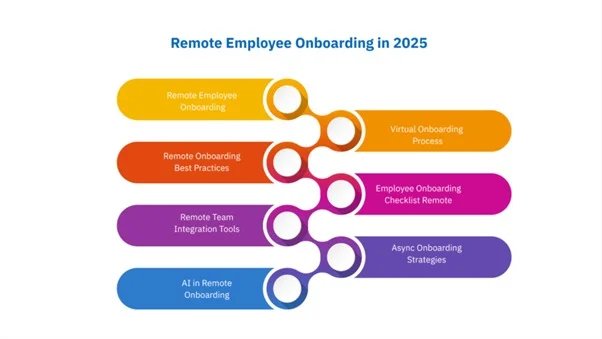
To get your stuff seen online, here are seven keywords from 2025 trends. They’re what bosses and new hires type when looking for help on remote starts. From fresh looks at searches, these pull in readers to posts like this. Use them in your writing or job ads.
- Remote Employee Onboarding: Basic term for full guides on adding remote workers to big searches in busy hire times.
- Virtual Onboarding Process: Step-by-step online plans, great for teams going paper-free.
- Remote Onboarding Best Practices: Simple tips like flexible habits and buddy matches, top HR sites.
- Employee Onboarding Checklist Remote: Easy lists for 30-60-90-day steps, always popular for a quick start.
- Remote Team Integration Tools: Focus on apps like Slack and Notion for fitting into group culture over distances.
- Async Onboarding Strategies: Growing for no-meeting ways that fit world clocks.
- AI in Remote Onboarding: New requests for chat help and auto-steps for custom, easy welcomes.
These can help show up higher in searches, reaching people like Sarah wanting better days. Use Google Keyword Planner to watch how they do.
Real-World Wins: Case Studies for Remote Teams
It helps to see real examples. Slack used async tips across times, raising early success by 25% and showing how remote groups stick together.
Fenergo’s online safety team fixed access with finger scans, cutting waits and worries by 40%. Idomoo’s far-apart creators added video hellos to speed joins by 35% and make it fun.
Support Your App’s moving team with mixed files and check-ins to add 100+ people smoothly. Super AGI mixed simple bots with team questions for 82% of stays, blending tech and care well.
Takeaway? Start with kindness and adjust your remote team. They can try Slack tips or Idomoo Videos quickly.
Emerging Trends: What’s Coming in 2025 for Remote Team Onboarding
2025 looks fun. AI leads to catching issues early and making personal starts, with 93% of teams wanting it but only 25% set up. Personal data grows with okay-based changes that 70% see as strong ties.
New stuff like VR for practice, safe logins with blocks, and partner help for more reach. Go all-online for green, and AI for easy world links. Faster starts need regular kind checks; top teams mix people and tech right.
Wrapping Up: Better Onboarding for Your Remote Team
Employee onboarding lights the way for remote teams to grow, making true links in online spaces. With steps to fix problems, tools, checks, and stories, you can make starts that count.
Try it: look at one step, add a nice touch, and talk to the team. See, keep going up, up; our work is better, and ideas flow.
Frequently Asked Questions
1. What is employee onboarding for remote teams?
It’s the process of helping new hires get settled and productive in a distributed work setup, using online tools and async methods instead of in-office meetings. This covers setup, training, and team integration to make them feel welcome from day one.
2. Why does remote onboarding matter so much?
Poor onboarding can lead to 20% of new hires quitting in the first 45 days, costing time and money. Done right, it boosts engagement by up to 82% and helps build a strong, connected team across time zones.
3. What are the biggest challenges in remote onboarding?
Time zone differences and tech glitches often cause confusion and drop-offs, with 36% of newbies feeling lost. Loneliness and cultural mix-ups can also raise disengagement by 20-30%, making isolation a real issue.
4. What are some simple best practices for remote onboarding?
Start with a personal welcome kit and async tools like Calendly to avoid scheduling headaches, plus a buddy system for check-ins. Add quick polls after steps and gamified training to keep things fun and boost completion by 25%.
5. Which tools are best for remote team onboarding?
Projetly creates easy guides that lift adoption by 30%. Free starters like Loom for videos and Typeform for polls cut setup time in half without extra cost.
6. How do you measure success in remote onboarding?
Track activation rates, aiming for 80%, and time-to-productivity under 21 days, which ties to 82% better retention. Use NPS over 50 and CSAT surveys to check feelings, reviewing every few months for tweaks.